
Microsoft Power Apps for small business
✅ Article Content
Introduction
Choosing the right data source in Power Apps isn’t just a technical decision—it directly affects cost, scalability, and long-term success.
This guide breaks down Power Apps data source pricing in 2026, helping UK SMEs understand the real cost of Dataverse, SQL Server, Azure SQL, and SharePoint.
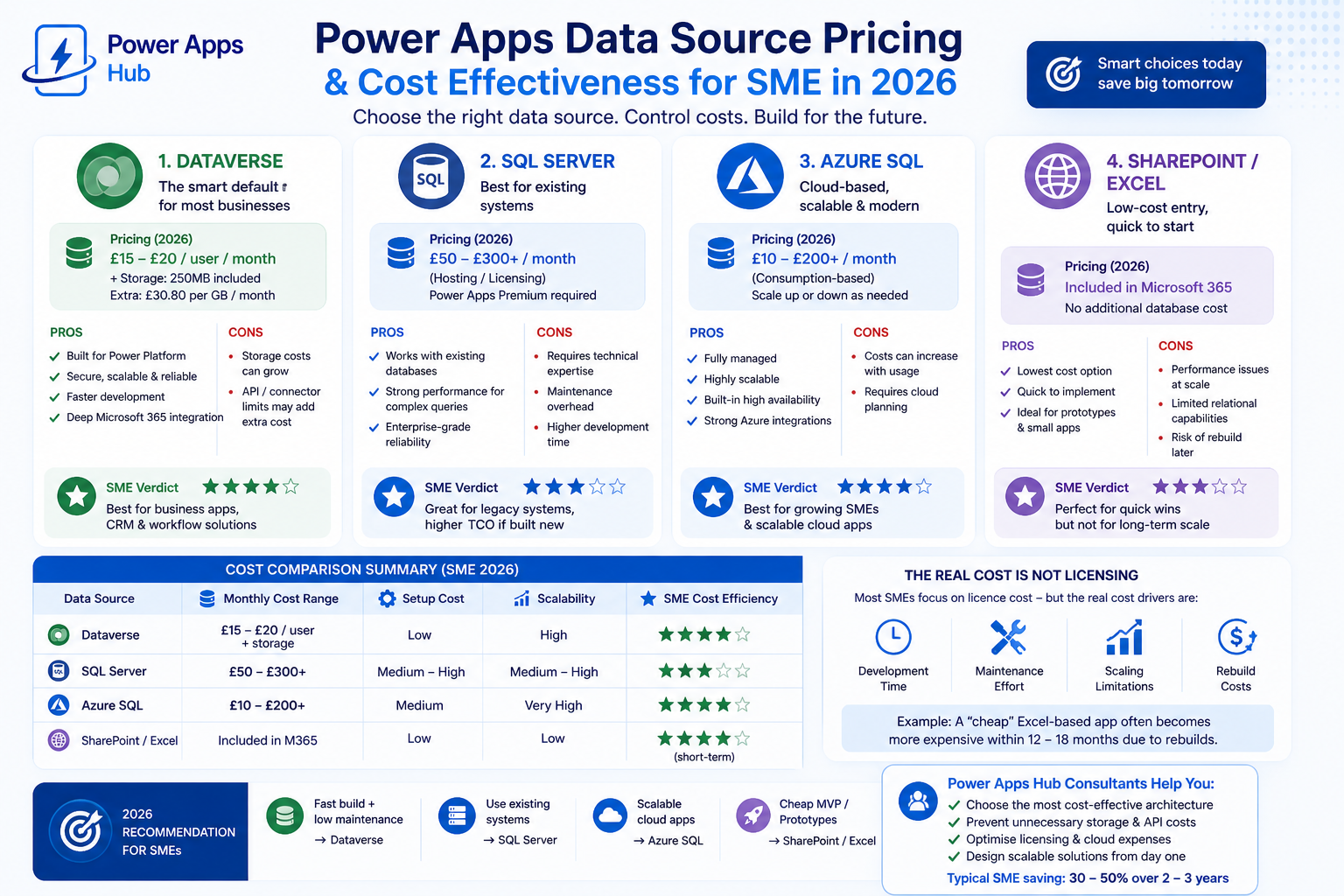
💰 Power Apps Data Source Pricing Overview (2026)
For most SMEs, the real cost of Power Apps comes down to:
- Licensing (per user or per app)
- Storage costs
- Development time
- Maintenance and scalability
👉 The key insight:
The cheapest option upfront is rarely the cheapest long-term.
🧾 Dataverse Pricing in Power Apps (2026)
Microsoft Dataverse is the default data platform for Power Apps—and often the most misunderstood in terms of cost.
💸 Pricing
- Included in Power Apps Premium (~£15–£20/user/month)
- ~250MB database storage per user
- Additional storage: ~£30.80 per GB/month
✅ Pros
- No infrastructure or setup cost
- Built-in security and relationships
- Faster development → lower build cost
❌ Hidden Costs
- Storage grows faster than expected (logs, attachments, relational data)
- API limits can require licence upgrades
💡 SME Verdict
Best for:
- Business-critical apps
- CRM-style systems
- Workflow-heavy solutions
👉 Cost Efficiency: ⭐⭐⭐⭐☆
🧾 SQL Server Cost for Power Apps
Microsoft SQL Server remains a strong option for businesses with existing systems.
💸 Pricing
- Typically £50–£300+/month (hosting/licensing)
- Requires Power Apps Premium licence
✅ Pros
- No migration needed
- Strong performance for complex queries
- Predictable storage costs
❌ Costs
- Maintenance (DB admin, backups)
- Higher development time → higher cost
💡 SME Verdict
Best for:
- Businesses with existing SQL infrastructure
👉 Cost Efficiency: ⭐⭐⭐☆☆
🧾 Azure SQL Pricing for Power Apps
Azure SQL Database is Microsoft’s cloud-native SQL offering.
💸 Pricing
- £10–£200+/month depending on usage
- Consumption-based scaling
✅ Pros
- Pay for what you use
- Highly scalable
- No infrastructure management
❌ Costs
- Can increase quickly if not optimised
- Requires cloud architecture planning
💡 SME Verdict
Best for:
- Growing businesses
- Scalable platforms or SaaS apps
👉 Cost Efficiency: ⭐⭐⭐⭐☆
🧾 SharePoint & Excel Cost in Power Apps
Microsoft SharePoint and Excel are often used as entry-level data sources.
💸 Pricing
- Included in Microsoft 365
- No additional database cost
✅ Pros
- Lowest upfront cost
- Quick to implement
- Ideal for MVPs
❌ Costs
- Performance issues at scale
- Limited relational data support
- High risk of rebuild
💡 SME Verdict
Best for:
- Small internal tools
- Prototypes
👉 Cost Efficiency: ⭐⭐⭐⭐⭐ (short-term)
👉 Cost Efficiency: ⭐⭐☆☆☆ (long-term)
📊 Power Apps Pricing Comparison (SME 2026)
| Data Source | Monthly Cost | Setup Cost | Scalability | Cost Efficiency |
|---|---|---|---|---|
| Dataverse | £15–£20/user + storage | Low | High | ⭐⭐⭐⭐☆ |
| SQL Server | £50–£300+ | Medium–High | Medium–High | ⭐⭐⭐☆☆ |
| Azure SQL | £10–£200+ | Medium | Very High | ⭐⭐⭐⭐☆ |
| SharePoint/Excel | Included | Low | Low | ⭐⭐⭐⭐☆ (short-term) |
🧠 Real SME Cost Scenario
A 25-user SME built a Power Apps solution using Excel (zero cost).
Within 9 months:
- Performance issues slowed operations
- Data integrity problems appeared
- Full rebuild in Dataverse required
👉 Final outcome:
Total cost was ~2x higher than starting with Dataverse
🧠 What Really Drives Power Apps Cost
Most SMEs focus on licensing—but real costs come from:
- Development time
- Maintenance effort
- Scaling limitations
- Rebuild costs
👉 Example:
A low-cost SharePoint solution often becomes expensive within 12–18 months.
🚀 Power Apps Pricing Trends (2026)
- Dataverse storage allowances have increased
- Low-code adoption is reducing development cost
- API and connector usage is becoming a key cost driver
- Cloud-first architecture (Dataverse + Azure SQL) is now standard
🧭 How to Choose the Right Data Source
- Small MVP (<50 users) → SharePoint or Excel
- Business-critical apps → Dataverse
- Existing systems → SQL Server
- Scalable cloud apps → Azure SQL
❓ FAQ: Power Apps Data Source Pricing
What is the cheapest Power Apps data source?
SharePoint or Excel—however, only in the short term.
Is Dataverse worth the cost for SMEs?
Yes. It reduces development time and supports long-term scalability.
Does Power Apps require premium licensing?
Yes—for Dataverse, SQL Server, and most connectors.
🔥 Final Verdict
- Dataverse = best balance of cost and speed
- Azure SQL = best for scalability
- SQL Server = best for legacy systems
- SharePoint = best for quick wins
👉 In Power Apps, you don’t pay for the platform—you pay for your architecture decisions.